Cashback
Cashback returns a percentage of a player's net losses over a calculation period. It is configured through reusable Cashback Templates, and paid out either as a claimable cash reward or as a bonus.
Accessing Cashback
- Open Promotions > Cashback in the sidebar. Viewing this page requires cashback access.
- The page opens on the Cashback Templates list.
This page manages reusable templates. Each individual player's cashback accumulation — their subscriptions and periods — is shown on the Player Details page; see Per-Player Cashback below.
The Templates List
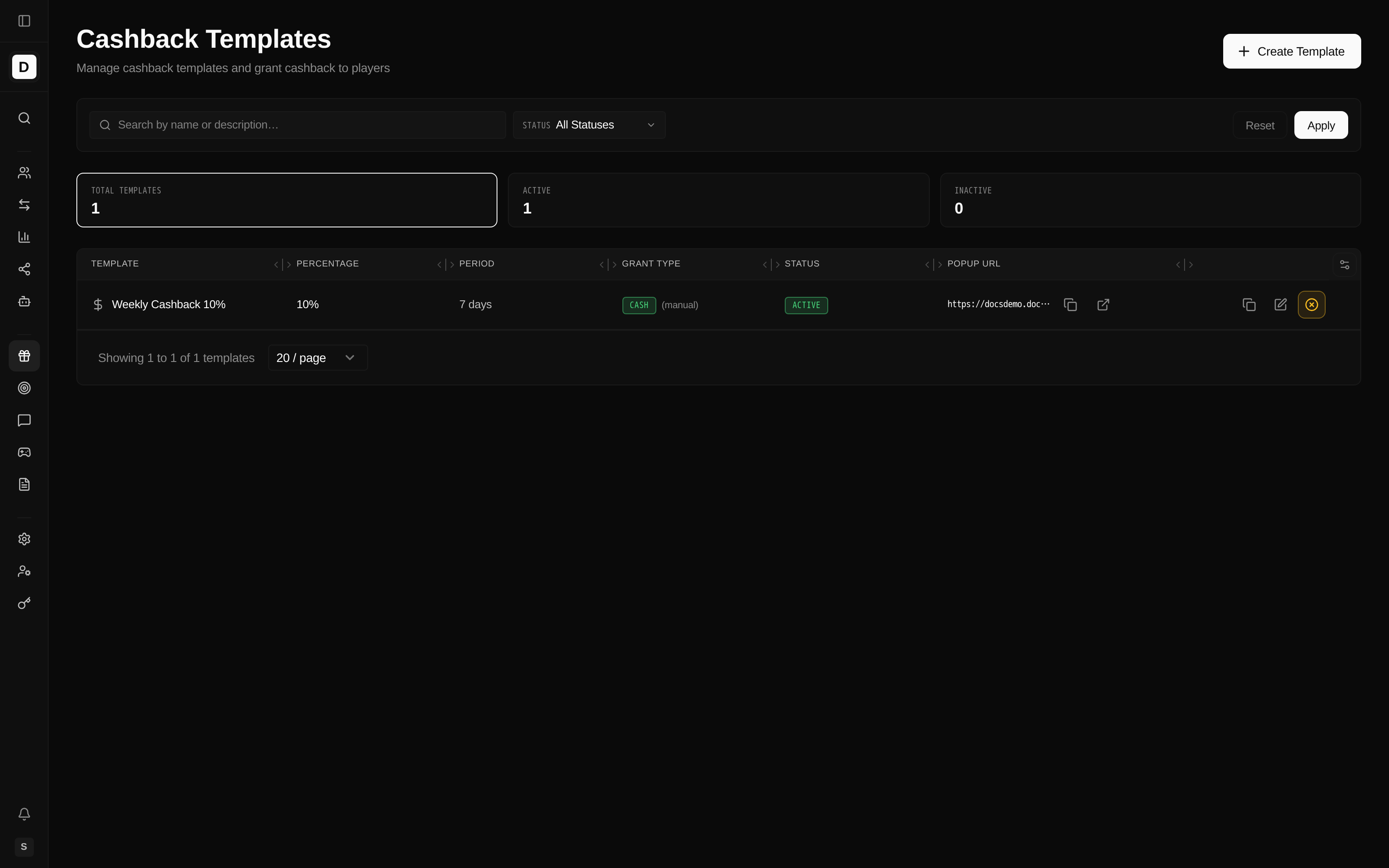
The page header reads Cashback Templates with a Create Template button. Below it are a search box, a status filter (Active / Inactive), summary stats cards, and a table of templates.
Template Columns
| Column | Description |
|---|---|
| Template | Name, optional description, and the default-currency Min/Max cashback amounts |
| Percentage | Cashback percentage |
| Period | Calculation period (value + hours/days) |
| Grant Type | Cash or Bonus (cash templates also show the claim method) |
| Status | Active or Inactive |
| Popup URL | A shareable link that opens this cashback offer's popup on the casino site; copy it or open it directly from the row to share the offer with players |
| Actions | Clone, Edit, Deactivate / Reactivate |
Row Actions
- Clone - copy an existing template as a starting point for a new one
- Edit - modify a template
- Deactivate - soft-deactivate an active template
- Reactivate - re-enable an inactive template
Creating or Editing a Template
Cashback returns a share of a player's losses, so a template lets you define the offer once and reuse it across players and tiers with consistent percentages, caps, and payout rules.
Click Create Template (or Edit on a row). The modal exposes:
| Field | Description |
|---|---|
| Name | Template name (e.g., "Daily Slots Cashback") |
| Cashback % | Percentage of net losses returned |
| Period | Calculation period: a value plus a unit of Hours or Days |
| Min Cashback Amount | Minimum cashback before payout, entered per currency |
| Max Cashback Amount (cap) | Optional per-currency cap; leave empty for no cap |
| Grant Type | Cash Reward or Bonus (see below) |
| Activation Method | Auto (activate immediately) or Manual (player must activate) |
| Game Restrictions | Optional — eligible game types, eligible/excluded games, contribution rates |
All monetary amounts are entered and displayed as exact per-currency values (never rounded floats).
Grant Type
A template pays out in one of two ways:
- Cash Reward - a standalone claimable real-money payout. You set a Claim Method (Manual — the player claims it, or Auto — instant credit) and optional Expiry Hours after which an unclaimed reward expires. A cash reward moves from Pending Claim to Credited, and can Expire or be Forfeited.
- Bonus - references a Bonus Template; the cashback is granted as that bonus.
The grant type determines how the player receives the cashback: a claimable real-money payout, or a bonus with its own terms.
Game Restrictions
The optional Game Restrictions section lets you scope which play counts toward cashback:
- Eligible Game Types - restrict to selected game types (empty = all games)
- Specific Eligible Games - limit to specific games
- Excluded Games - exclude specific games
- Contribution Rates - a default contribution rate plus per-game-type overrides (as percentages)
How Cashback Works
Calculation Formula
Cashback Amount = Net Losses × Cashback Percentage
Where:
- Net Losses = Total Bets − Total Wins (weighted by any per-game contribution rates)
- Cashback Percentage = the template's percentage
Example Calculation
Player Activity (over one period):
- Total Bets: 1,000
- Total Wins: 800
- Net Losses: 200
- Cashback Rate: 10%
Cashback Amount: 20 (subject to the template's per-currency min/max).
Per-Player Cashback
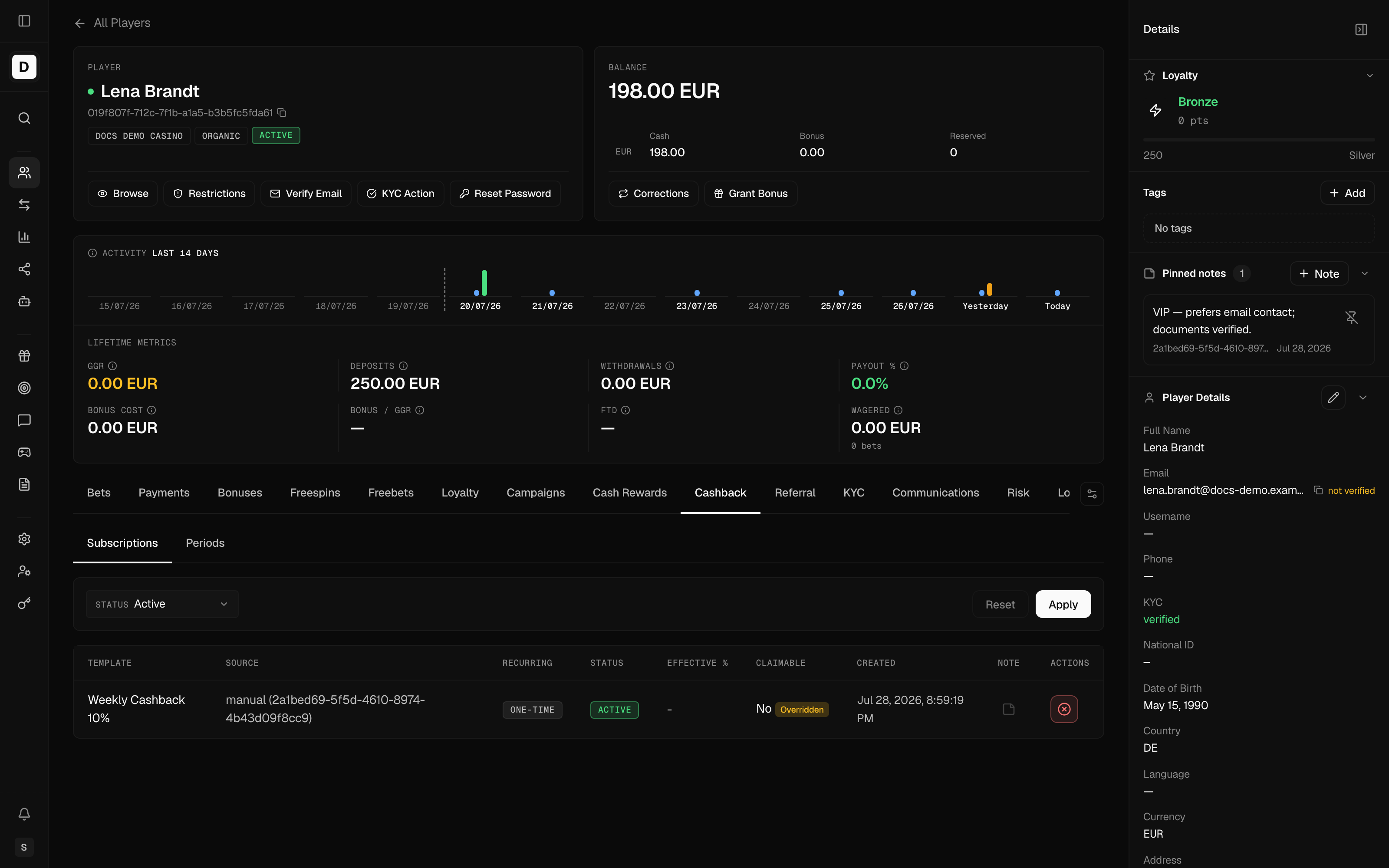
Each player's cashback accumulation lives on the Player Details page under a Cashback tab, which has two sub-tabs:
- Subscriptions - the templates a player is subscribed to
- Periods - the player's accumulation windows and their calculated amounts
Period Statuses
A cashback period can be in one of these statuses:
| Status | Meaning |
|---|---|
| Open | Period is active and tracking bets |
| Processing | Period claimed for crediting (intermediate) |
| Calculated | Period ended, cashback calculated but not yet credited |
| Credited | Cashback credited to the player |
| Expired | Period expired without crediting (e.g., below minimum) |
| Rolled Over | Period frozen due to a subscription overwrite; awaits combined settlement |
| Cancelled | Period cancelled (e.g., subscription deactivated with zero bets) |
Cashback vs. Bonuses
| Feature | Cashback | Bonus |
|---|---|---|
| Trigger | Net losses | Deposit or action |
| Wagering | Depends on grant type | Usually required |
| Timing | End of period | Immediate |
| Amount | % of losses | Fixed or % of deposit |
Best Practices
- Set realistic per-currency minimum thresholds
- Use templates to standardize offers; assign templates to tiers for tier-based rates
- Clone an existing template rather than rebuilding a similar one
- Review unusual cashback amounts on the Player Details page
- Communicate cashback terms clearly to players
- Monitor cashback costs vs. retention impact
Common Issues
No Cashback Generated
- Player had net wins, not losses
- Amount below the template's per-currency minimum
- Period type or template deactivated
- Player not subscribed to the template
Incorrect Amount
- Check the calculation period settings
- Verify game restrictions and contribution rates
- Confirm the correct template is assigned