Brands
Manage multiple casino brands from a single backoffice.
What is a Brand?
A brand represents a distinct casino property with its own:
- Domain and website
- Branding (logo, colors)
- Supported countries and languages
- Currency settings
- Content (games, banners, pages)
Multi-Brand Architecture
The platform supports multiple brands from one login:
Backoffice (Single Login)
       │
       ├── Brand A (casino-a.com)
       │     ├── Regional Players
       │     ├── EUR Currency
       │     └── Specific Games
       │
       ├── Brand B (casino-b.com)
       │     ├── EU Players
       │     ├── EUR Currency
       │     └── Specific Games
       │
       └── Brand C (casino-c.com)
             ├── Global Players
             └── Multiple Currencies
Accessing Brands
- Open Brands under the Settings section of the sidebar
- View the list of configured brands
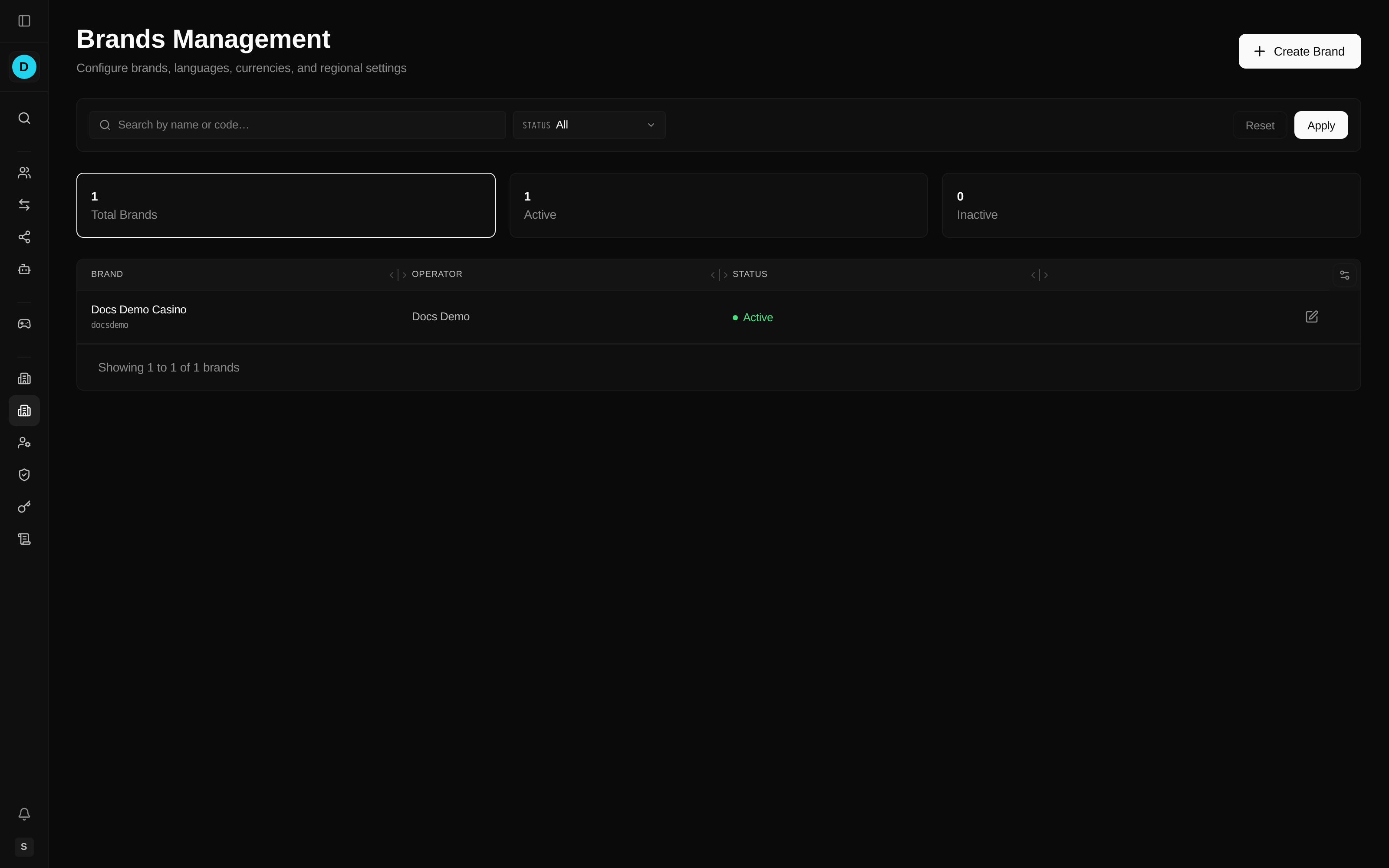
The list shows each brand's name and code, its parent operator, and its status (Active or Inactive), with headline counts of total, active, and inactive brands. Use the search box or the status filter to narrow the list.
Brand Settings
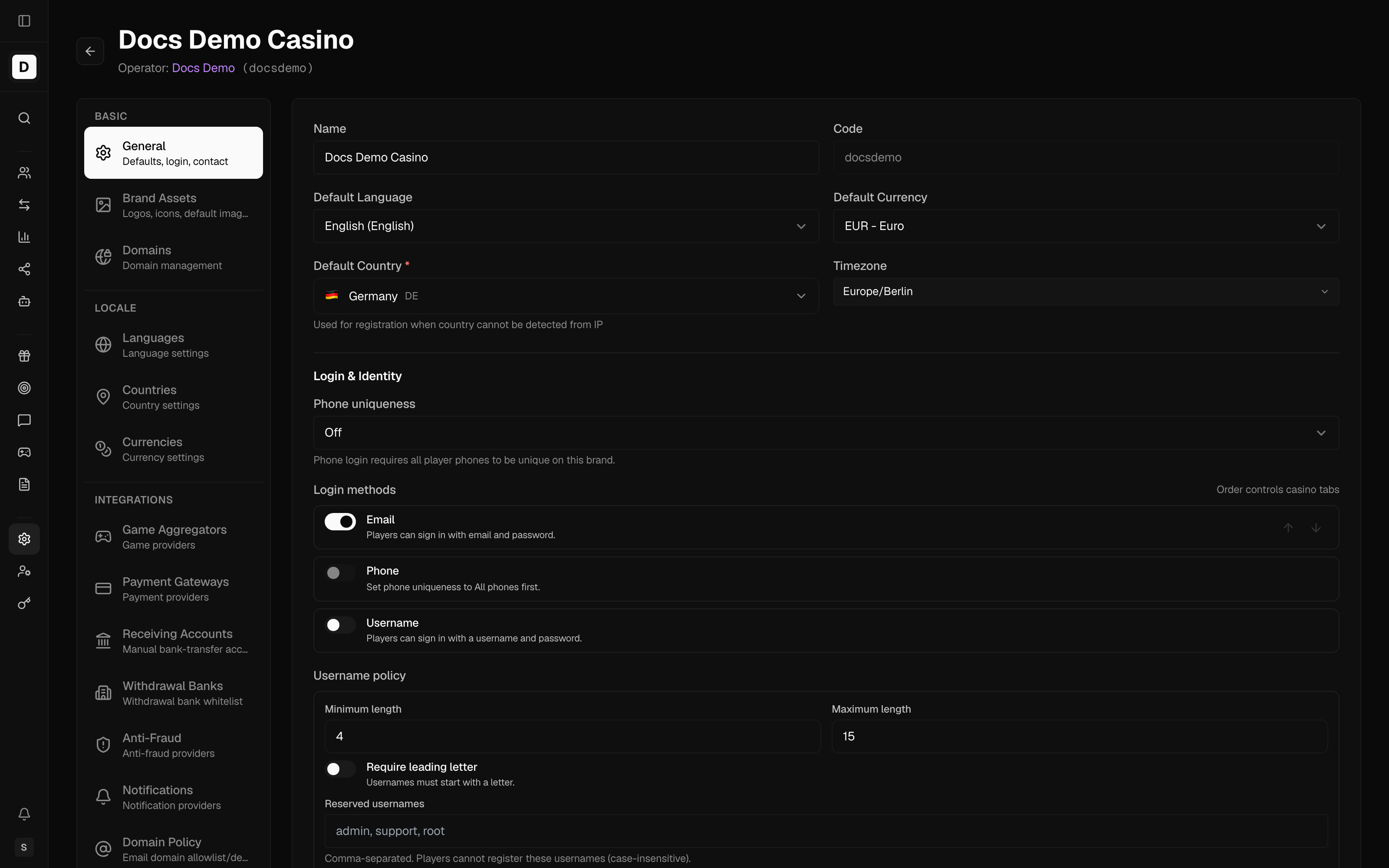
Every brand belongs to an Operator (required when creating a brand) and inherits the operator's configuration wherever a brand-level value isn't overridden.
Know Your Customer (KYC) is the identity-verification process for a Player.
The brand editor is a large tabbed interface. Tabs are grouped as:
- Basic — General (defaults, login, contact), Brand Assets (logos, icons, default images), Domains
- Locale — Languages, Countries, Currencies
- Integrations — Game Aggregators, Payment Gateways, Anti-Fraud, Notifications, Domain Policy, AI (artificial intelligence) Behavior, Chat Support, Analytics
- Content — Social Links
- Legal — License & Compliance, KYC, Cookie Consent, Restrictions
- Routing — Redirects
- Appearance — Themes, Templates
- Security — Passwords, Rate Limits
- Operations — Data Management, Deposit Wagering
Basic Information
| Field | Description |
|---|---|
| Name | Brand display name |
| Code | Unique identifier (e.g., brand-a) |
| Operator | Parent operator (required) |
| Status | Active or Inactive |
Domains are not a single field — they are managed on a dedicated Domains tab, where you can add multiple domains, mark a casino domain as primary, and set each domain's purpose: Casino (the player-facing website), TDS (a redirect domain for links in email, SMS and web push — it must forward any path and query to the live casino domain; it also serves email images), or Mobile App (the native app's origin for links, assets and web views). One active TDS and one active Mobile App domain per brand; both fall back to the casino domain when not set.
Rotating a TDS domain. Messages keep the TDS domain that was active when they were sent: short links and unsubscribe links in emails, SMS and web push all point to it, and they stay valid for 90 days. When you replace a TDS domain, keep the old domain forwarding to the live casino domain (its DNS record and redirect) for at least 90 days, and Deactivate the old domain instead of deleting it, so links in messages already sent keep working.
Regional Settings
Supported Countries
Configure which countries can access this brand:
- Click Countries tab
- Add or remove countries
- Save changes
Players from unsupported countries cannot register.
Supported Languages
Choose the languages the brand's site is offered in so players can use it in their own language:
- Click Languages tab
- Add languages (e.g., English, German, Spanish)
- Set the default language
- Save changes
Supported Currencies
Set which currencies players can hold and transact in so wallets and payments match your target markets:
- Click Currencies tab
- Add currencies (e.g., EUR, GBP, SEK)
- Set the default currency
- Save changes
On the Currencies tab you select the brand's supported currencies, mark the default currency, and can optionally require whole-number deposit and withdrawal amounts.
Creating a Brand
Add a new brand to launch a distinct casino property under an operator:
- Click Create Brand
- Enter basic information (name, code, parent operator)
- Configure regional settings (default language, default country, currency)
- Click Create
Switching Brands
Switch the active brand so the content and settings you edit apply to the property you intend:
- Look for the brand selector (usually top navigation)
- Click to open the dropdown
- Select the target brand
- Content management now reflects that brand
Brand-Specific Content
The following content is brand-specific:
- Games and game lists
- Banners and carousels
- Pages and menus
- Translations
- Bonus templates and campaigns
Shared Configuration
Some settings are shared across brands:
- User accounts and roles
- Global system settings
- Payment provider connections (configured per brand)
Anti-Fraud
Screen player activity for fraud and abuse without hand-reviewing every account. Brands (and their parent operators) configure an anti-fraud provider on the Anti-Fraud tab. Brand-level configuration takes precedence over the operator's; where a brand defines nothing, it inherits the operator's setup. Anti-fraud decisions arrive after the fact and may suspend players or reject withdrawals.
Data Management
Reuse a proven brand setup instead of rebuilding it by hand. The Data Management tab lets you move brand configuration between brands:
- Export a brand's configuration to a file.
- Import a configuration file into a brand.
- Clone one brand's configuration into another (available once more than one brand exists).
These actions are available to super-admins and to operators whose role grants brand export/import access.
Best Practices
- Plan brand structure - Design brands based on target markets
- Consistent naming - Use clear brand codes and names
- Document differences - Note unique settings per brand
- Test thoroughly - Verify each brand's configuration before launch
- Monitor separately - Track metrics per brand for insights
Common Use Cases
Geographic Separation
Different brands for different regions (EU brand, UK brand, etc.)
Product Separation
Different brands for different products (casino, sports, poker)
Regulatory Compliance
Separate brands to meet licensing requirements in different jurisdictions