Player Communication Preferences
Every player has a set of communication preferences that control which messages they receive. Operators view and manage these from the Communications tab on the player's profile. This is where you audit a player's opt-in state, apply an override with a documented reason, and review why a player may have been unsubscribed automatically — a documented preference trail supports consent and marketing-compliance obligations.
Terms Used on This Tab
A One-Time Password (OTP) is a single-use code used to confirm an action.
| Term | Meaning |
|---|---|
| Opt in / Opt out | Whether the player currently receives messages for a given purpose. |
| Marketing email | Promotional and campaign messages the player can freely opt out of. |
| System / One-Time Password (OTP) email | Account-security and one-time-passcode messages (a single-use code emailed to the player to confirm an action). |
| Group | A notification group; brands are commonly set up with a single "general" group. |
Accessing a Player's Preferences
Open a player profile and select the Communications tab. The tab shows:
- The preference matrix (current opt-in/out state)
- An Override preference action
- Preference history
- Short Message Service (SMS) deliveries and Email deliveries panels
Preference Matrix
The matrix lists one row per purpose × group combination on the email channel — email is the channel the matrix surfaces — with a brand-wide default shown at the top (Opted in / Opted out). In practice that is a Marketing email row for every notification group, plus a System / OTP email row for the general group. Each row shows:

| Column | Meaning |
|---|---|
| Channel | |
| Purpose | Marketing email, or System / OTP email (general group only) |
| Group | The notification group (brands are often set up with a single "general" group) |
| State | Opted in / Opted out, with "(override)" when a player-specific override is in effect |
| Source | How the current state was set (see below) |
| Updated | When the state last changed |
A row with no player-specific override inherits the brand default.
Overriding a Preference
Use Override preference to set a player's opt-in state explicitly — for example to honour a direct opt-out or opt-in request from the player, or to correct a mistaken subscription, while capturing an audit reason for the change:
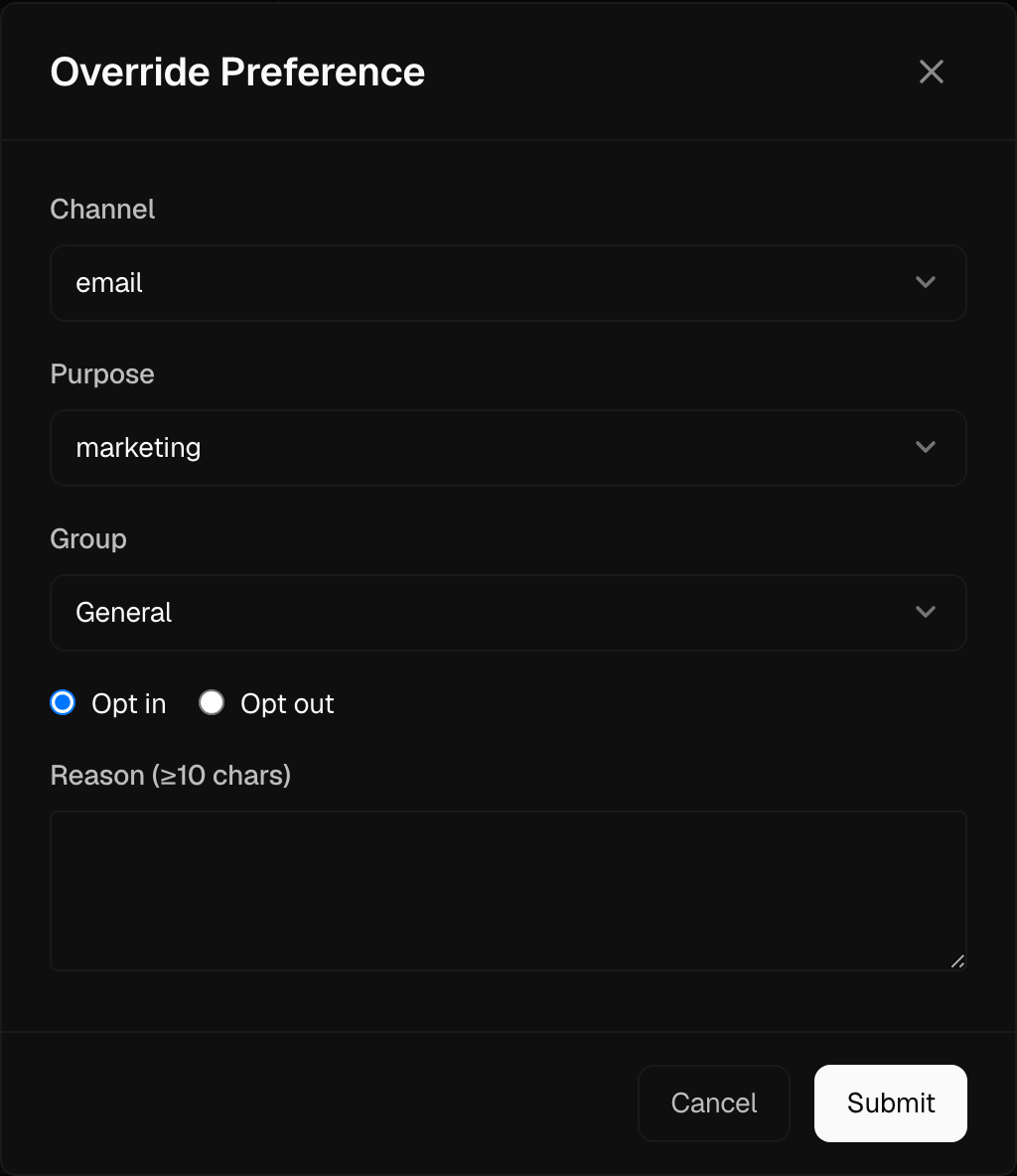
- Choose the Channel (email or SMS) and Purpose.
- Choose the Group.
- Select Opt in or Opt out.
- Enter a Reason — this is mandatory and must be at least 10 characters.
- Submit.
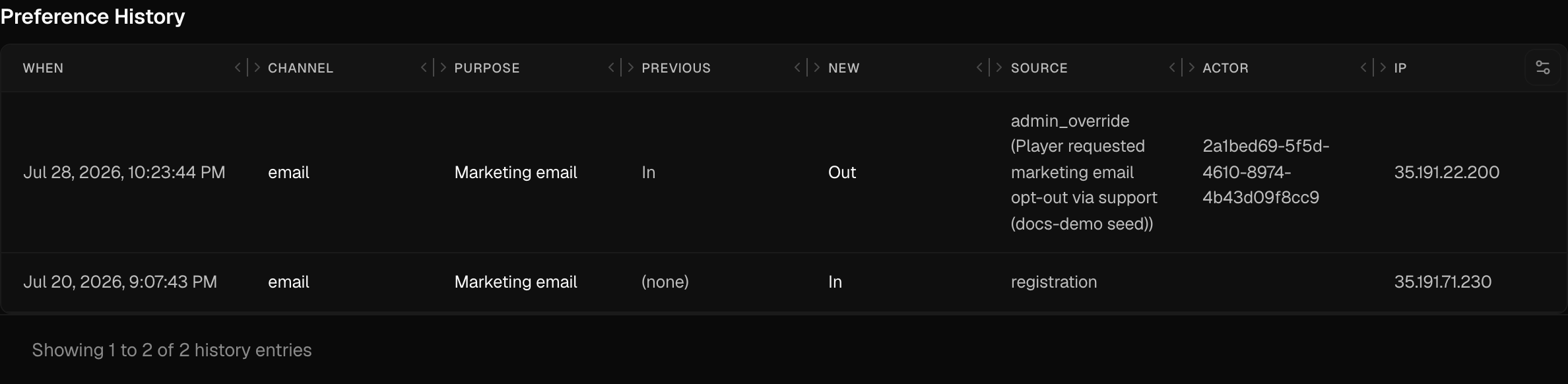
The override is recorded in the preference history with the reason and the acting operator, so consent decisions stay auditable.
System / OTP Email
The System / OTP email purpose covers account-security and one-time-passcode messages. It is shown only to operators granted permission to manage system and OTP subscriptions, and it is locked to the email channel and the general group — those selections are fixed whenever this purpose is chosen.
Preference Sources
The Source column explains how each preference state was set. Common values include registration, account preference centre, one-click header, footer link click, admin override, and brand-default flip. One source is surfaced with a friendly label:
- Auto-disabled — email delivery failure — the player was unsubscribed automatically (see below).
Automatic Unsubscribe on Email Delivery Failure
When a player's email address reaches a blocked status (for example after a hard bounce), that player is automatically opted out of both email purposes (marketing and System / OTP) for the general group. This protects sending reputation and deliverability.
These auto-unsubscribes appear in the matrix with the source Auto-disabled — email delivery failure. Soft bounces, spam complaints, and normal deliveries do not trigger an automatic unsubscribe.
Delivery Panels
The SMS deliveries and Email deliveries panels on the same tab show the player's recent message deliveries, useful when investigating why a message did or did not arrive.