Campaigns
Campaigns let you organize and schedule promotional offers over defined time periods, so you can run seasonal or targeted promotions with a clear start and finish and measure how players respond.
What is a Campaign?
A campaign is a promotional period that:
- Has defined start and end dates
- Contains one or more bonus rewards
- Targets specific players by segment and country
- Tracks opt-in and completion metrics
Creating a Campaign
Grounding each promotion in a fixed schedule and a defined audience keeps offers consistent and auditable across markets.
- Navigate to Campaigns in the sidebar
- Click Create Campaign
The Campaigns list is where every promotion lives, with one row per campaign:

Each row summarizes the campaign's type, opt-in mode, fulfillment requirement, reward, live analytics, display order, a shareable popup URL, and its Active/Inactive status.
Campaign Details
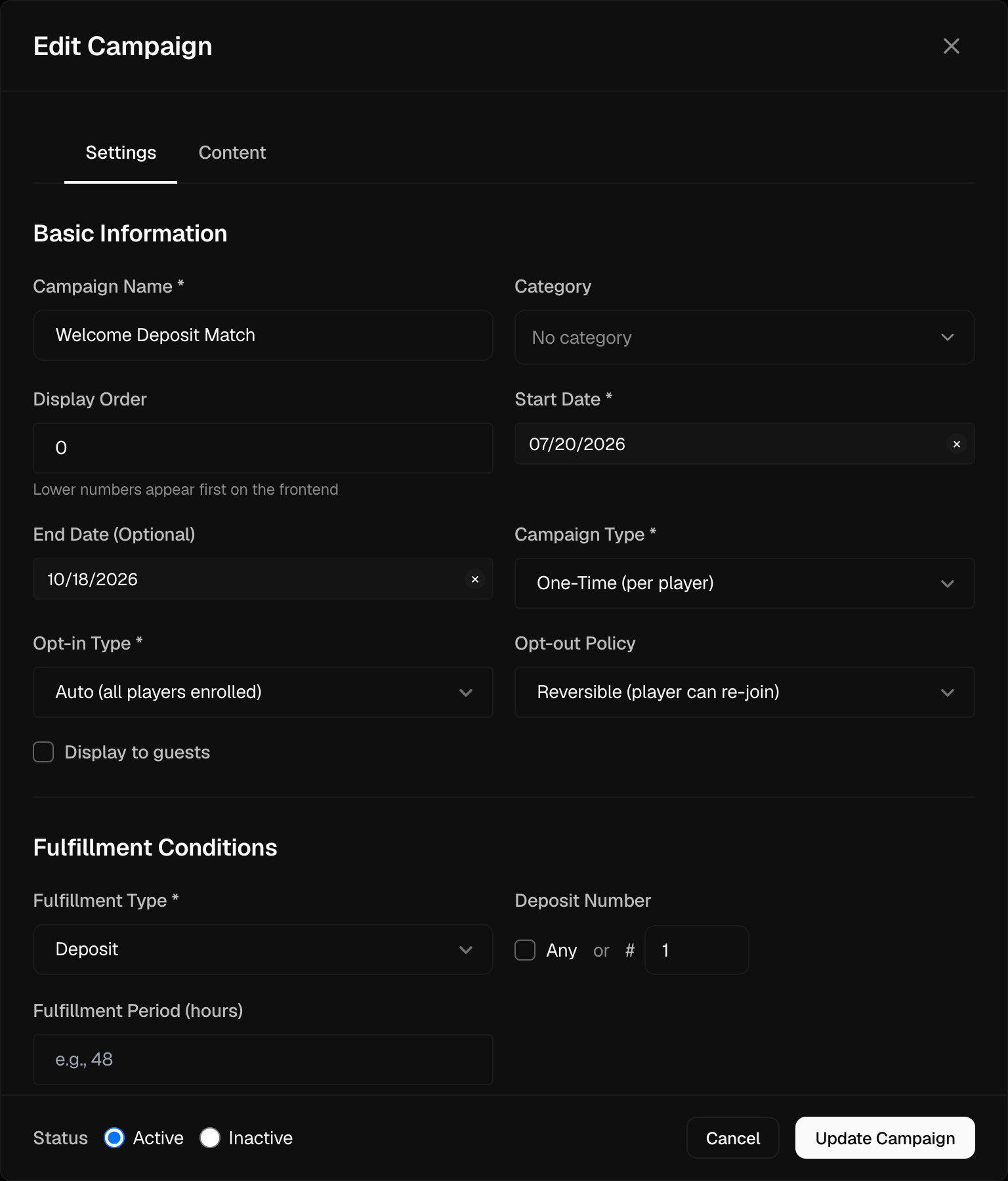
| Field | Description |
|---|---|
| Name | Internal campaign name |
| Description | Campaign purpose and goals |
| Start Date | When the campaign begins |
| End Date | When the campaign ends (optional) |
| Status | Active or Inactive (a single toggle) |
Creating a campaign (via the Create Campaign button) also requires a Fulfillment type (what the player must do to earn the reward), a Campaign type (One-Time or Repeatable), and an Opt-in type (Auto or Manual). These are covered below.
Fulfillment
The Fulfillment type ties the reward to a concrete player action, so a bonus is only granted once its qualifying condition is met:
Know Your Customer (KYC) is the identity-verification process for a Player.
| Fulfillment | Player must… |
|---|---|
| No (Announcement Only) | nothing — informational only |
| Instant Reward | nothing — reward granted on opt-in |
| Deposit | make a qualifying deposit (optionally the nth deposit, with per-currency minimums) |
| Bet | place qualifying bets |
| Email Verification | verify their email |
| Phone Verification | verify their phone |
| KYC Completed | complete identity checks |
| PWA Install | install the Progressive Web App (PWA) |
Rewards
A campaign grants one or more rewards. Click Add Reward to add each one and pick a Reward Type:
| Reward Type | Per-reward configuration |
|---|---|
| Bonus Template | pick a template; set it as a deposit match (match % + max bonus per currency) or a fixed absolute amount per currency |
| Free Spins | game, spin count, and coin value |
| Freebet | pick a freebet template; per-currency amount overrides (see Freebets) |
| Cashback | pick a cashback template; recurring toggle and optional overrides |
| Cash Reward | fixed amount per currency, claim method, expiry |
All rewards are granted when the campaign is completed.
Enrollment and chaining
Additional campaign options:
- Campaign type — One-Time or Repeatable (Repeatable supports a cooldown between completions)
- Opt-in type — Auto or Manual, with an opt-out policy (reversible or permanent)
- Promo code with optional auto-opt-in
- Max enrollments, display order, and a category
- Prerequisite campaigns — chain campaigns so one only becomes available after another is completed (or opted out of)
Target Audience
Define who can participate. Eligibility is one of:
- All Players — available to everyone
- Segment — include and/or exclude one or more player segments
Either option can additionally include or exclude a list of country codes (ISO alpha-2 two-letter country codes), so you can honor licensing and regulatory restrictions market by market.
Campaign State
A campaign's state is a single Active / Inactive toggle (the Status field), bounded by its Start Date and optional End Date window. The campaigns list shows an Active or Inactive pill driven by this toggle.
Managing Campaigns
From the campaigns list, each row has these actions:
- Edit — change any field, including toggling Status to Inactive to deactivate the campaign
- Clone — duplicate the campaign as a new one (not available for Bet fulfillment campaigns)
- Delete — remove the campaign
To stop a campaign, open Edit and set its Status to Inactive; the campaign stops running while its setup is retained for later reuse.
Each row also provides a shareable Popup URL you can copy or open to preview the campaign's promotional popup.
Campaign Analytics
Each campaign's analytics expose exactly four counters:
- Total Opted In — players who opted in to the campaign
- Total Completions — number of times the campaign was completed
- Unique Players — distinct players involved
- Players In Progress — players currently working toward fulfillment
The campaigns list shows two of these per row: Total Opted In (labeled "opted in") and Unique Players (labeled "completed").
Best Practices
Return On Investment (ROI) is revenue generated relative to the cost of an activity.
- Set clear goals - Define success metrics before launch
- Test first - Run with a small segment before full launch
- Monitor daily - Check performance and adjust if needed
- Document learnings - Record what worked for future campaigns
- Segment wisely - Target the right audience for better ROI
Example Campaign
Summer Slots Festival
Duration: July 1-31 (Start/End Date)
Fulfillment: Deposit
Rewards:
  - Bonus Template — 100% match, max bonus 200 per currency
  - Free Spins — 50 spins on the featured slot
Eligibility: All Players
Opt-in: Auto