Postbacks & Conversion Tracking
Postbacks are outbound HTTP calls the platform makes to an affiliate network when a tracked event happens for one of the affiliate's referred players. They let networks record conversions on their own side. Postbacks are configured per affiliate, on the affiliate details Postbacks tab.
Event Types
You configure a separate postback per event type. Only the events you enable are sent.
| Event | When it fires |
|---|---|
| Registration | A referred player registers |
| First-Time Deposit (FTD) | The player's first completed real deposit |
| Deposit (2nd+) | Second and subsequent completed real deposits |
| Withdrawal | A withdrawal completes successfully |
| Manual Withdrawal | An operator-approved manual withdrawal completes |
| Confiscation | An operator debits player funds via confiscation/adjustment |
Configuring a Postback
Configure a postback per event so the affiliate network is notified when a qualifying conversion happens for one of its referred players. For each event card you can set:
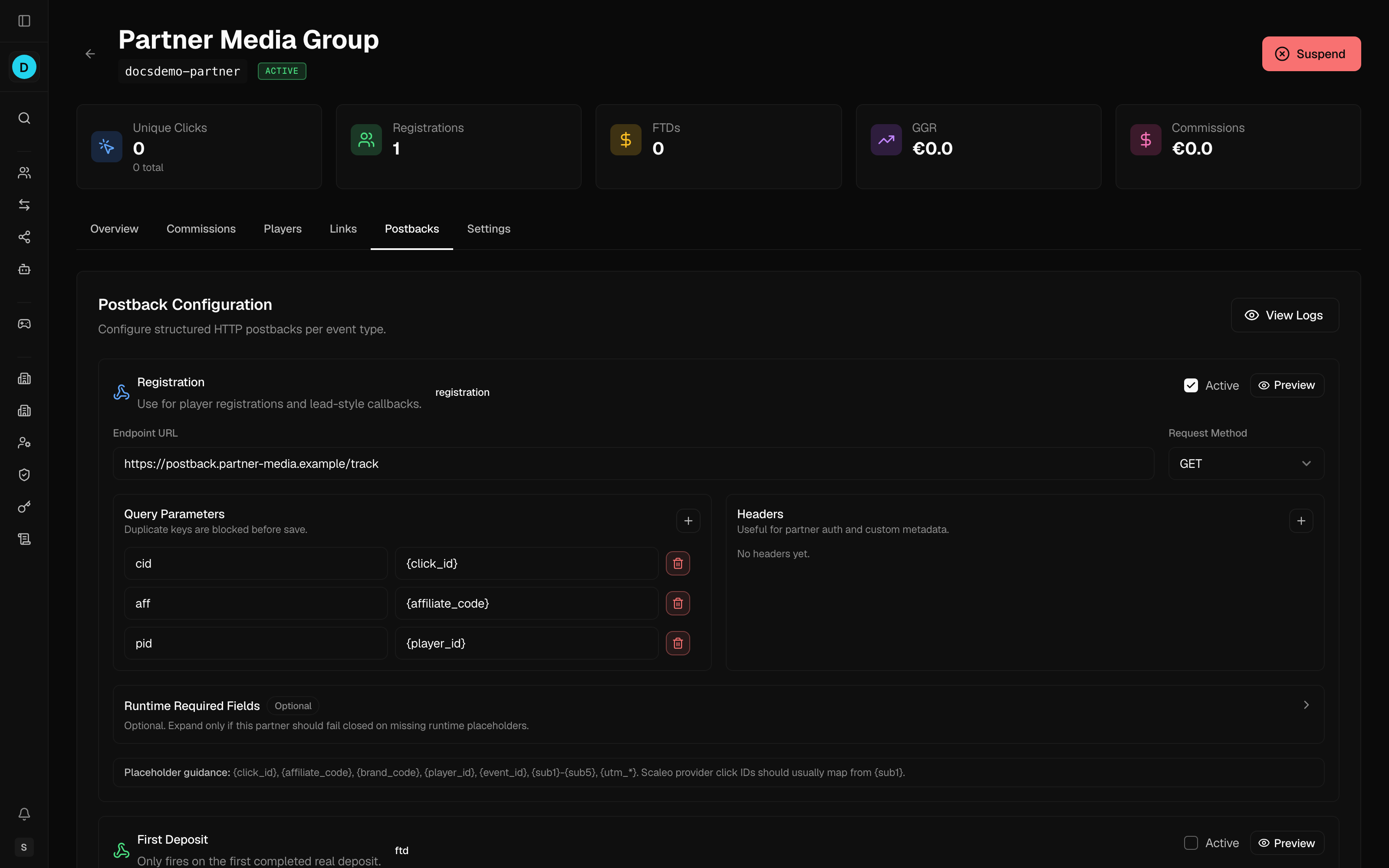
- Endpoint URL — the network's postback URL; must be a static absolute URL (no placeholders). Put dynamic values in the query params, headers, JSON body, or form fields instead
- Request Method —
GETorPOST - Query Params — key/value pairs appended to the URL (values may contain placeholders)
- Headers — request headers (values may contain placeholders)
- Body Mode (POST only) —
none,json, orform-urlencoded - Body / Form Fields — the request body for POST postbacks
- Runtime-required fields — placeholders that must resolve to a real value at send time; if a required field is missing, the postback is not sent. Note:
{sub1}–{sub5},{utm_*},{goal_id}, and{currency}can be selected and stored but never block delivery — when missing they render as an empty string and the postback is still sent - Active toggle — turn the postback on/off without deleting its configuration
GET postbacks always use body mode none.
Preview (dry run)
Each event card has a Preview button that renders the request (method, URL, headers, body) with placeholders filled from sample data, without actually sending it. Use it to confirm the endpoint and template are correct before enabling.
Placeholders
Placeholders are written in braces and replaced at send time. All values are strings.
| Placeholder | Meaning |
|---|---|
{click_id} | Click tracking ID |
{goal_id} | Conversion goal ID |
{affiliate_code} | Affiliate code |
{brand_code} | Brand code |
{player_id} | The player's unique identifier |
{player_country_code} | The player's country code |
{event_id} | Stable outbound event identifier |
{amount} | Transaction amount |
{amount_scaleo} | Transaction amount in Scaleo format |
{currency} | Transaction currency |
{payment_method} | Payment method used for the transaction |
{transaction_id} | Transaction ID |
{withdrawal_id} | Withdrawal ID |
{timestamp} | ISO 8601 (International Organization for Standardization) timestamp |
{timestamp_unix} | Unix epoch timestamp, in seconds |
{timestamp_scaleo} | Scaleo-format UTC (Coordinated Universal Time) timestamp (YYYY-MM-DD HH:MM:SS) |
{sub1}–{sub5} | Custom tracking params captured at registration |
{utm_source}, {utm_medium}, {utm_campaign}, {utm_term}, {utm_content} | Campaign-tracking (UTM) parameters captured from the landing link |
Not every placeholder is meaningful for every event — for example {withdrawal_id} only resolves on withdrawal events, and {amount}/{currency} are empty on registration.
If the partner expects its own click identifier, configure the request to read it from {sub1}. Note that {sub1} cannot fail-close delivery even if marked runtime-required — if it is missing it renders as an empty string and the postback is still sent.
Delivery & Logging
Postbacks notify the affiliate network of a conversion so it can attribute the referral and pay the affiliate. Every send attempt is recorded in the Postback Logs (see below), so you can confirm each conversion reached the network.
Each attempt is classified by outcome:
- Success — the endpoint returned a
2xxresponse. - Client error (
4xx) — treated as a permanent failure; the attempt is not repeated. - Server error (
5xx) or network error — recorded with a Retrying status and a scheduled next-attempt time.
Postbacks are de-duplicated per (affiliate, event type, player, event), so the same conversion is not sent twice.
Postback Logs
Affiliates → Postback Logs (also reachable via View Logs on the Postbacks tab) shows postback delivery history across all affiliates.
Each row shows:
| Column | Description |
|---|---|
| Timestamp | When the attempt was made |
| Affiliate | The affiliate (links to their details) |
| Event | The event type |
| Status | Pending, Success, Failed, or Retrying |
| Response | HTTP response status code |
| Time | Response time in milliseconds |
| Details | Expand to see the full request and outcome |
Expanding a row reveals the request method and URL (with a copy button), request headers and body, the attempt number, and the next scheduled retry time (when retrying).
Filters
- Affiliate — limit to one affiliate
- Status — Pending / Success / Failed / Retrying
- Date range — filter by attempt date
Scaleo Pull Integration
As an alternative to pushing postbacks, the Scaleo network can pull an affiliate's attributed activity. Configure this on the affiliate details Settings tab under Scaleo Pull Settings:
- Enable Scaleo pulling — when on, requests made with this affiliate's token return only this affiliate's attributed Scaleo activity.
- Scaleo API token — the token Scaleo uses when requesting exports. A token must be configured before pulling can be enabled; leaving the field blank keeps the existing token.